How to Read Your Walk-In Freezer’s Control Panel & Alarms
If your walk-in freezer suddenly starts beeping at 2 AM, would you know what it is trying to tell you?
Many business owners ignore freezer alarms until food starts thawing or products get damaged. But your control panel is actually an early warning system designed to protect your inventory, reduce downtime, and prevent expensive repairs.
Understanding walk in freezer controls is no longer something only technicians should know. Restaurant managers, hospital facility teams, warehouse operators, and food business owners can all benefit from learning the basics.
According to the U.S. Department of Energy (DOE), commercial refrigeration systems consume a significant amount of a facility’s electricity, which means even small inefficiencies can quickly increase operating costs. Preventing problems early through proper monitoring and walk in freezer maintenance can help avoid unnecessary energy waste.
This guide explains how to read your control panel, understand common alarms, and know when it’s time to call a refrigeration specialist.
Why Your Walk-In Freezer Control Panel Matters
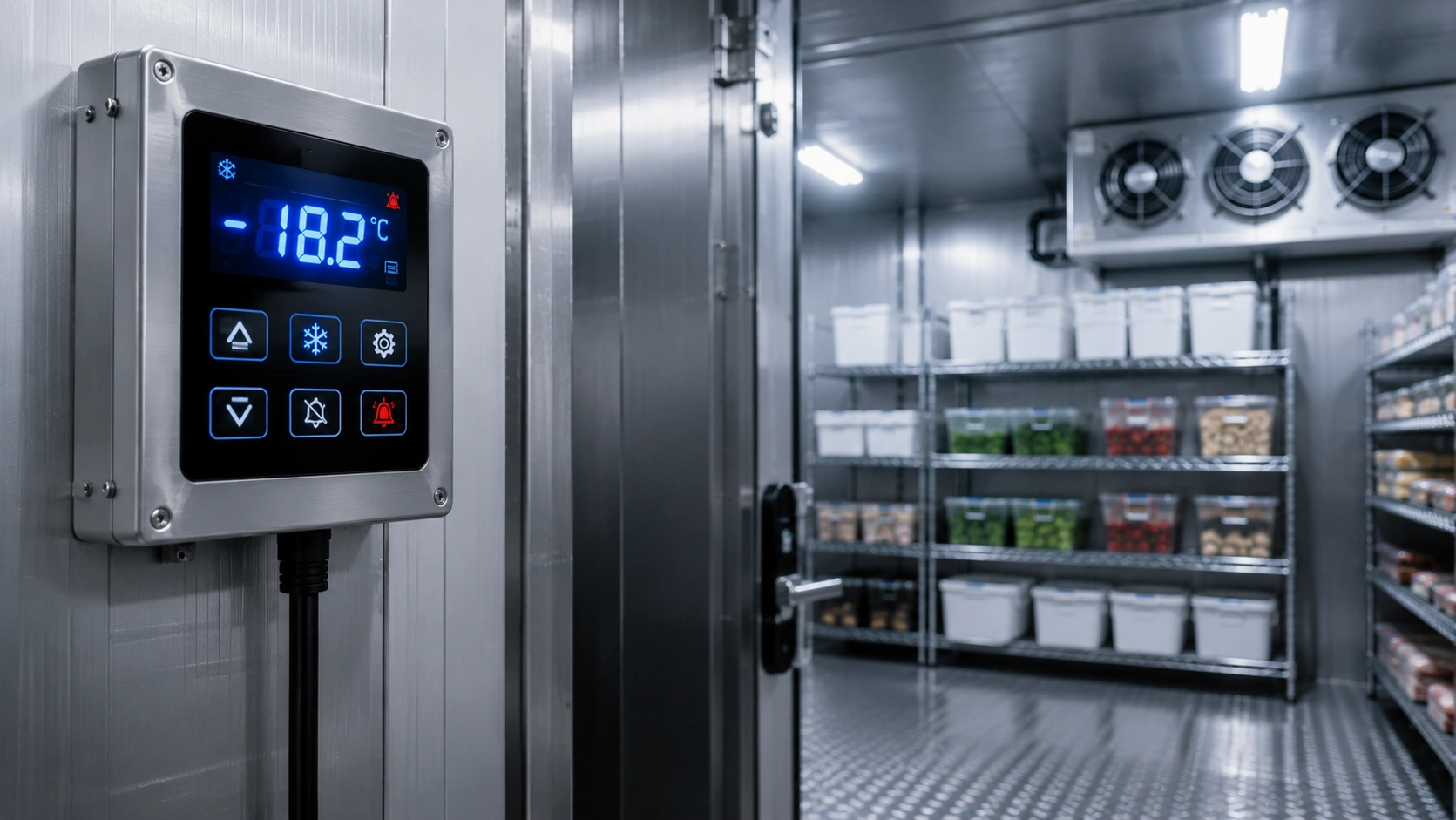
Think of the control panel as the brain of your freezer.
It continuously monitors temperature, airflow, compressor performance, and defrost cycles. Modern systems can even detect problems before equipment fails.
Without understanding what the display means, businesses often miss early warning signs that later become costly emergencies.
Common brands may vary, but most control panels work similarly.
Typical information displayed:
- Internal temperature
- Set temperature
- Defrost cycle status
- Compressor status
- Fan operation
- Alarm notifications
- Error codes
Businesses that regularly monitor these readings can catch issues much earlier.
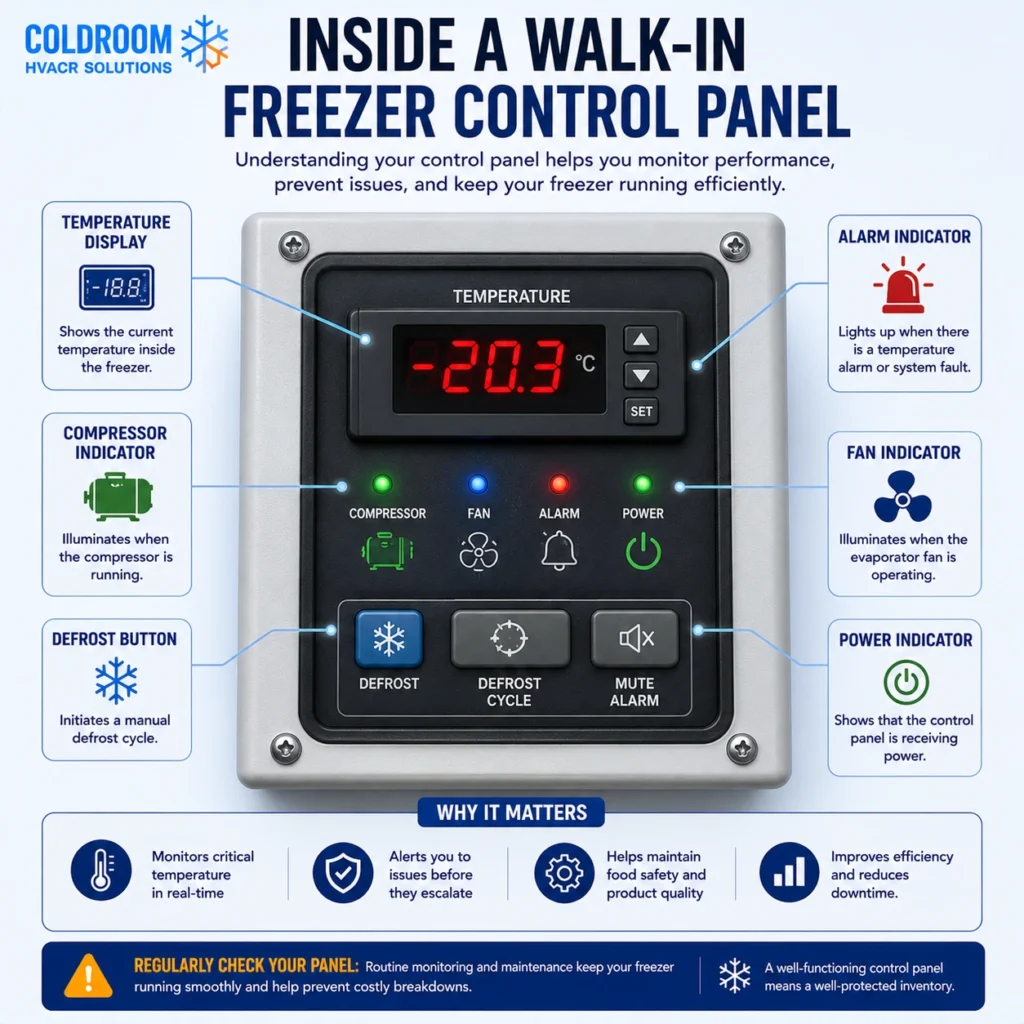
Understanding the Main Parts of Walk In Freezer Controls
Most systems contain five key sections.
Temperature Display
This is the current temperature inside your freezer.
Commercial walk-in freezers typically operate between -18°C and -23°C (0°F to -10°F).
If temperatures rise above this range, products may become unsafe.
Always compare:
Current temperature vs Set temperature.
If the gap becomes too large, something needs attention.
Set Point
The set point is your target temperature.
For example:
Current temperature: -15°C
Set point: -20°C
Your freezer is warmer than it should be.
Possible reasons include:
- Door left open
- Dirty condenser coils
- Defrost issue
- Compressor problem
Compressor Indicator
The compressor acts like the heart of the refrigeration system.
When active, an icon or light appears.
If the compressor runs constantly, this could indicate:
- Air leaks
- Dirty coils
- Poor insulation
- Overloaded freezer
Continuous operation can increase electricity costs and wear out components faster.
Fan Indicator
Fans distribute cold air evenly.
If the fan stops working, you’ll notice:
- Warm spots
- Ice buildup
- Uneven temperatures
Many alarm systems will notify you immediately.
Defrost Indicator
Every freezer periodically enters defrost mode.
This prevents excessive ice accumulation.
Defrost cycles usually occur several times daily and last 15 to 45 minutes.
Seeing “DEF” on the screen is normal.
If it remains active for too long, service may be required.
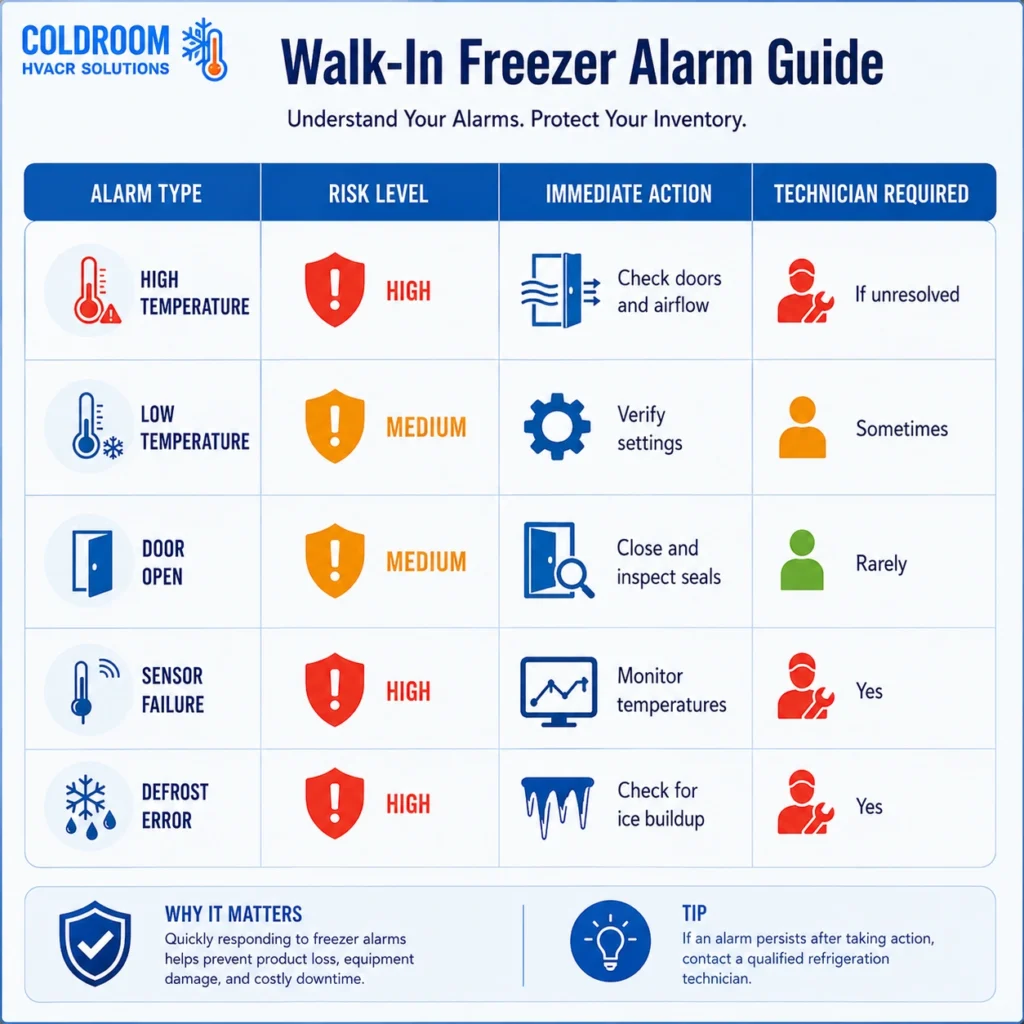
The Most Common Walk-In Freezer Alarm Codes Explained
Different manufacturers use different codes, but these are the most common.
High Temperature Alarm
Possible messages:
- HI TEMP
- HIGH ALARM
- H1
What it means:
The freezer temperature has risen above safe limits.
Common causes:
- Door left open
- Warm product overload
- Dirty condenser
- Refrigerant issue
Immediate action:
Check door seals and airflow first.
Low Temperature Alarm
Possible messages:
- LO TEMP
- L1
What it means:
The freezer is colder than intended.
Possible causes:
- Faulty thermostat
- Sensor malfunction
- Incorrect settings
Overcooling wastes energy and can damage products.
Door Open Alarm
This alarm activates when doors remain open too long.
Causes include:
- Staff forgot to close the door
- Damaged door gasket
- Faulty switch
Even a small air leak can force the compressor to work harder.
Sensor Failure Alarm
Possible codes:
- E1
- E2
- SENSOR FAIL
The temperature sensor is no longer sending accurate information.
Without accurate readings, the freezer cannot regulate itself properly.
Professional inspection is recommended.
Defrost Alarm
Possible codes:
- DEF ERROR
- DF
This indicates the freezer cannot complete its defrost cycle.
Common causes:
- Faulty heaters
- Bad timer
- Ice accumulation
Ignoring this alarm often leads to severe icing problems.
How to Respond When an Alarm Goes Off
Stay calm.
Most alarms do not mean the freezer is broken.
Follow this simple process.
Step 1: Read the Error Code
Take a photo if necessary.
Do not reset it immediately.
The code helps technicians diagnose problems faster.
Step 2: Check Door Seals
Look for:
- Tears
- Gaps
- Ice buildup
Damaged gaskets are one of the most common causes of energy loss.
Step 3: Verify Temperature
Use an independent thermometer.
Sometimes sensors fail while temperatures remain normal.
Step 4: Check Airflow
Ensure nothing blocks:
- Evaporator fans
- Air vents
Overloaded shelving can reduce cooling efficiency.
Step 5: Call Professionals if the Alarm Returns
Repeated alarms usually indicate underlying issues.
How Regular Walk In Freezer Maintenance Prevents Alarm Problems
Many alarms are completely avoidable.
Routine walk in freezer maintenance keeps systems reliable.
ASHRAE (American Society of Heating, Refrigerating and Air-Conditioning Engineers) recommends regular inspection of refrigeration equipment to improve efficiency and performance.
A simple maintenance schedule can prevent emergency breakdowns.
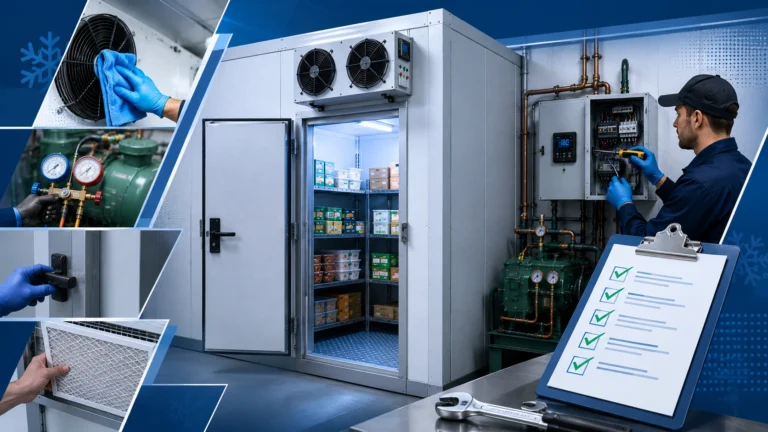
Weekly Tasks
Check:
- Temperature readings
- Door seals
- Alarm history
Monthly Tasks
Inspect:
- Condenser coils
- Fan operation
- Ice buildup
Quarterly Tasks
Schedule professional servicing.
Technicians should inspect:
- Refrigerant levels
- Electrical components
- Defrost systems
- Sensors
Consistent maintenance extends equipment lifespan and reduces unexpected shutdowns.
Warning Signs You Should Never Ignore
Certain signs require immediate attention.
These include:
- Frequent alarm resets
- Rising temperatures
- Excessive frost
- Water on floors
- Constant compressor operation
- Loud noises
If these symptoms appear together, do not delay repairs.
Waiting can lead to inventory loss.
Want a tailored recommendation or quick quote? Reach out today
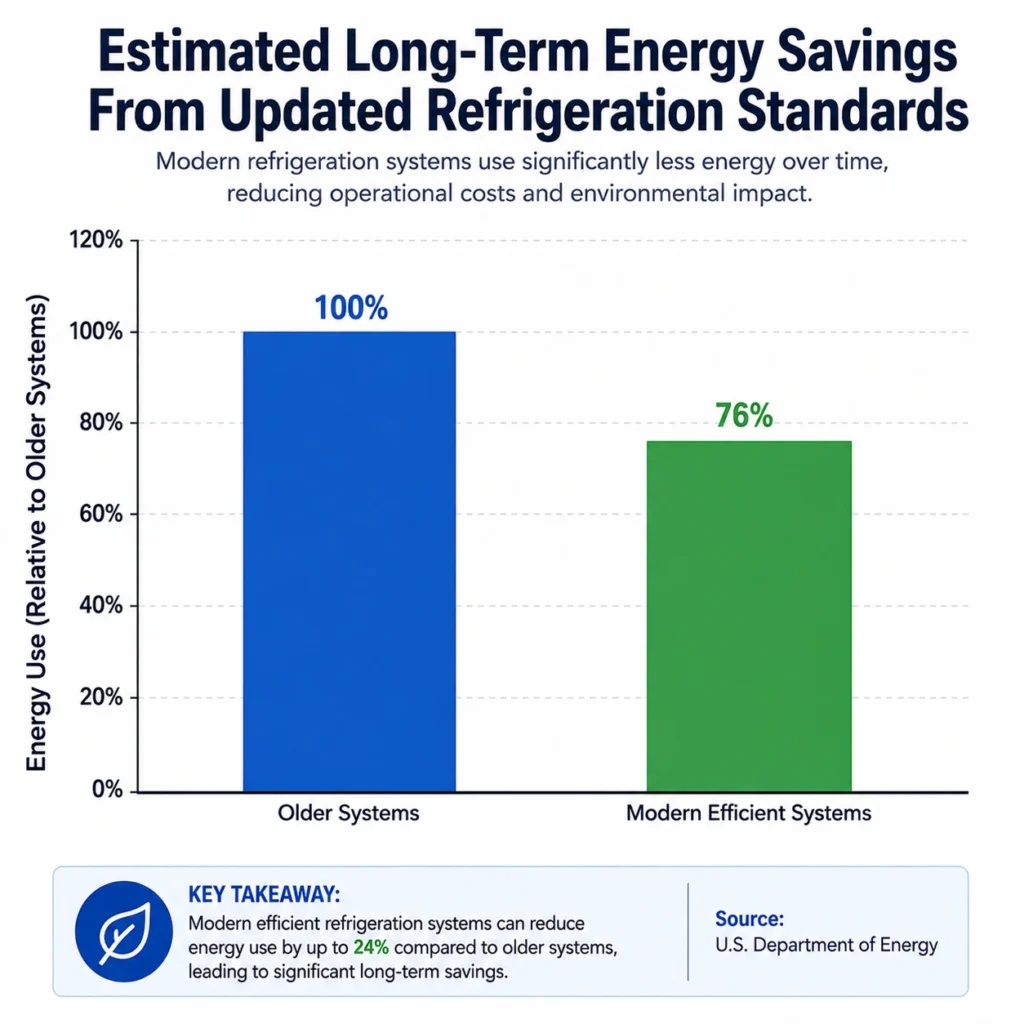
How Smart Monitoring Systems Are Changing Freezer Management
Modern systems allow remote monitoring.
Facility managers can receive alerts directly on their phones.
Benefits include:
- Faster response times
- Reduced downtime
- Better temperature tracking
- Improved food safety compliance
The U.K Department of Energy estimates updated refrigeration efficiency standards could reduce energy use by approximately 24% over long-term operation compared to older systems.
Technology investments often pay for themselves through lower energy consumption.
Walk-In Freezer Alarm Troubleshooter
De-code flashing panel errors and buzzer warnings to find out exactly what is triggering your system alarm and how to resolve it safely.
Emergency Technical Evaluation Report
Immediate Recommended Action Step:
-
Cold Room Plus Emergency System Notes:
A Simple Daily Checklist Every Staff Member Can Follow
It only takes two minutes.
Ask your team:
- Is the displayed temperature normal?
- Are there any active alarms?
- Is frost building up?
- Are the doors sealing properly?
- Is anything blocking airflow?
Small checks every day can prevent major disruptions later.
When was the last time someone on your team actually checked your walk-in freezer control panel instead of simply pressing the reset button? Share your biggest freezer challenge or discuss it with your maintenance team today.
Frequently Asked Questions
1. What do walk in freezer controls do?
Walk in freezer controls manage the temperature, defrost cycles, fan operation, and compressor performance inside a commercial freezer. They continuously monitor the system and trigger alarms when something is wrong. Understanding these controls helps businesses prevent food spoilage, reduce energy costs, and avoid unexpected equipment breakdowns.
2. What temperature should a walk-in freezer be set at?
Most commercial walk-in freezers should be set between -18°C and -23°C (0°F to -10°F) to safely preserve frozen products. The exact setting may vary depending on the type of inventory stored and local food safety regulations.
3. Why is my walk-in freezer alarm beeping?
A walk-in freezer alarm usually indicates a problem that needs attention. Common causes include:
- High internal temperature
- Door left open
- Sensor malfunction
- Defrost cycle errors
- Fan or compressor issues
Never ignore repeated alarms, as they can lead to product loss and expensive repairs.
4. What is the most common walk-in freezer alarm code?
The most common alarm is the high-temperature alarm, often displayed as “HI TEMP,” “HIGH ALARM,” or “H1.” This means the freezer temperature has risen above safe operating levels and requires immediate investigation.
5. How often should walk in freezer maintenance be performed?
Basic walk in freezer maintenance should be done weekly, while professional servicing should be scheduled every 3 to 6 months. Regular maintenance helps prevent system failures, improves energy efficiency, and extends equipment lifespan.
6. Why is my walk-in freezer constantly running?
A freezer that runs continuously may indicate:
- Dirty condenser coils
- Damaged door seals
- Refrigerant leaks
- Excessive ice buildup
- Overloaded inventory
Continuous operation increases energy bills and can shorten the life of major components.
7. Can I reset a walk-in freezer alarm myself?
Yes, but only after identifying the cause. Simply resetting the alarm without fixing the underlying issue can lead to recurring problems and costly repairs. If the alarm returns, contact a commercial refrigeration specialist.
8. What happens if a walk-in freezer defrost cycle fails?
A failed defrost cycle can cause excessive ice buildup on evaporator coils, reduced airflow, higher energy consumption, and poor cooling performance. Over time, this may damage the compressor and lead to complete system failure.
9. How can I improve the efficiency of my walk-in freezer?
You can improve efficiency by:
- Monitoring walk in freezer controls daily
- Cleaning condenser coils regularly
- Inspecting door seals
- Avoiding overloading shelves
- Scheduling professional maintenance
These simple steps help reduce energy costs and minimize downtime.
10. When should I call a professional for walk-in freezer repairs?
You should contact a professional immediately if you notice:
- Repeated alarm codes
- Rising temperatures
- Excessive frost buildup
- Water leaks
- Loud noises
- Continuous compressor operation
Early repairs can prevent inventory loss and expensive emergency breakdowns.